1In one sentence
Deep Research is a mode where Gemini shows you a plan, then reads dozens of web pages for several minutes and writes a long report with citations, while you do something else.
2New words
- Deep Research — the tool, found in the + menu under More tools. Also the name of the report it makes.
- Research plan — the list of steps Gemini proposes before it starts. You can edit it.
- Citation — a small number in the text that points to a source in the list at the end.
- Audio Overview — a spoken, podcast-style summary Gemini can make from the finished report.
3Why you would want it
Some questions are not one answer but a morning of reading: which oven to buy for a small bakery, what permits a food stall needs, how three competitors price their delivery. Deep Research does the reading. It is slow (five to fifteen minutes is normal) and uses a lot of your limit, so it is for questions that deserve it.
4Try it now
- Start a new chat. Click +, then More tools, then Deep research (a small label appears in the message box).
- Type: Research what a small bakery should look for when buying its first commercial deck oven: types, typical price bands, running costs, and common mistakes. Prefer sources from the last two years.
- Gemini shows a plan with steps (Research Websites, Analyze Results, Create Report) and a note like "Ready in a few mins". Read it. If something is missing (say, "energy use"), reply with the change before you press Start.
- Go make tea. Come back when the report is ready; the page updates itself.
- Read the summary first, then click two citations you find surprising.
5What you will see
The plan card with its three steps and a Start button, and then a progress view listing the sites it is reading:
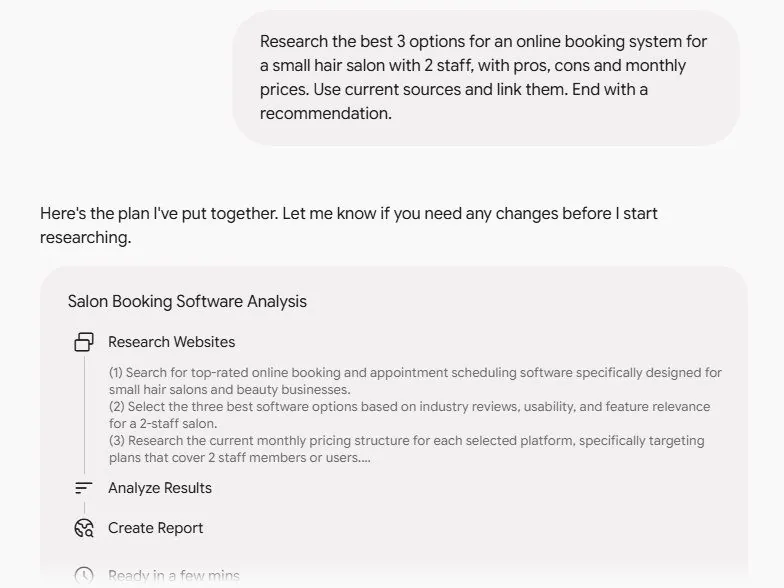
The finished report has headings, numbered citations in the text, and a "Sources used" list. A Create button at the top can turn it into a web page, infographic, quiz, flashcards or an Audio Overview, and Share & export can send it to Google Docs.
6Watch out
- Approving a bad plan wastes the whole run. Spend thirty seconds on the plan; it is the only moment you can steer.
- The report reads with great confidence. Pick three facts and check their citations yourself before you act on it. On a Free account a few reports use up your limit; a wasted one hurts.
7Go further
Ask, in the same chat: Turn this into a one-page checklist for a buyer. Then read Chapter 1.9, where Gemini stops writing and starts drawing.