1In one sentence
Midjourney is a program that turns a written description into pictures: you type what you want, and about ten seconds later you get four images to choose from.
2New words
- Image generator — an AI that makes pictures from words instead of writing text. Midjourney only makes pictures (and short videos); it does not chat, answer questions or write emails.
- Prompt — the sentence you type to describe the picture. Same word as in the Claude chapters, same idea.
- Grid — the set of four pictures Midjourney makes for every prompt. You pick the one you like and work on it.
- Model version — the "brain" that draws the picture. In November 2026 the newest is called V8.2 (released July 2026); V8.1 (the default since June 2026) and V7 are still available in the settings. Check the version picker in settings to see which one you are on.
3Why you would want it
Think of every time you needed a picture and did not have one: a photo for a social post, a mock-up of a logo idea, a poster for a sale, a picture of what the new shop counter could look like. Stock photos are generic, photographers cost money and time, and your phone pictures look like phone pictures. Midjourney makes a specific picture of exactly your idea in seconds. Its strong point is looks: pictures tend to come out like good photography or illustration even when your prompt is short. It is not good at everything (text inside pictures, exact repeat results, and precise instructions are weak spots; see Chapter 1.12).
4Try it now
- Open your web browser and go to midjourney.com.
- Click Explore in the left menu. You do not need an account for this; the bar at the top says "Log in to start creating", and you can ignore it for now. Use the Images / Videos switch at the top to see pictures or clips.
- Scroll. Every picture you see was made from a sentence. Hover or click a picture to read the prompt that made it.
- Find a picture close to something you would use. Read its prompt twice; notice how plain the words are.
5What you will see
A wall of pictures made by other people, with a search box at the top, and the prompt under each one when you open it.
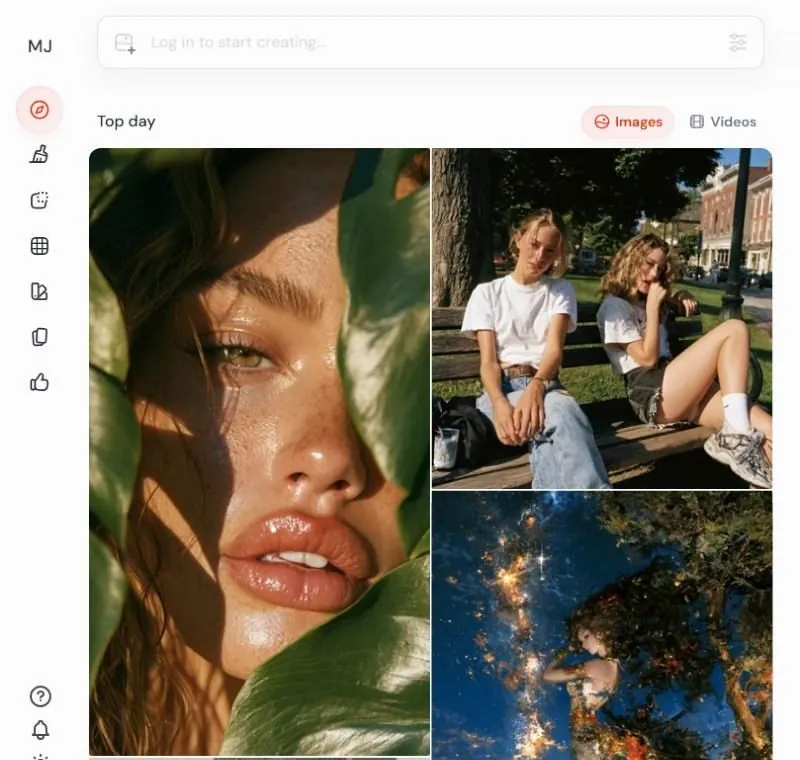
This page is the best free lesson in prompting there is, because you see the words and the result side by side.
6Watch out
- There is no free trial on the website or Discord in November 2026. You can look at Explore for free, but to make a picture you need a paid plan (Chapter 1.3).
- Midjourney makes what is on Explore public by default. Your own pictures will be public too unless you are on a plan with Stealth Mode (Chapter 1.12).
7Go further
Copy a prompt you like from Explore into a note; you will paste it in Chapter 1.4. Then read Chapter 1.2 to see the two doors into Midjourney.