
1In one sentence
Give Claude your colors, fonts and style once, as a design system, and every design after that uses them without you asking.
2New words
- Design system — a saved set of rules for how your things should look: colors, typography (fonts and sizes), spacing, buttons, logo use. Designers keep one for every brand.
- Brand — the consistent look and voice of a company or person. Your design system is the brand written down.
- Typography — the fonts and how they are used: which font for headlines, which for text, how big.
3Why you would want it
Without a design system, every design starts from Claude's taste and you keep saying "no, our blue". With one, the bakery's cream-and-copper look (or your real brand) is already there in the first draft of every page, deck and post. Teams can keep more than one, for different brands.
4Try it now
(paid plans)
- In Design, click Design System under "Make something new", or open the "Choose design system" menu in a new design and click Manage design systems.
- Give Claude your website address, or upload a brand file, or describe the look: Cream background, copper accent, a friendly serif for headlines, rounded buttons.
- Open a new design, choose that design system in the menu, and ask for a social post.
5What you will see
The design system menu in a new design, with the link to manage systems:
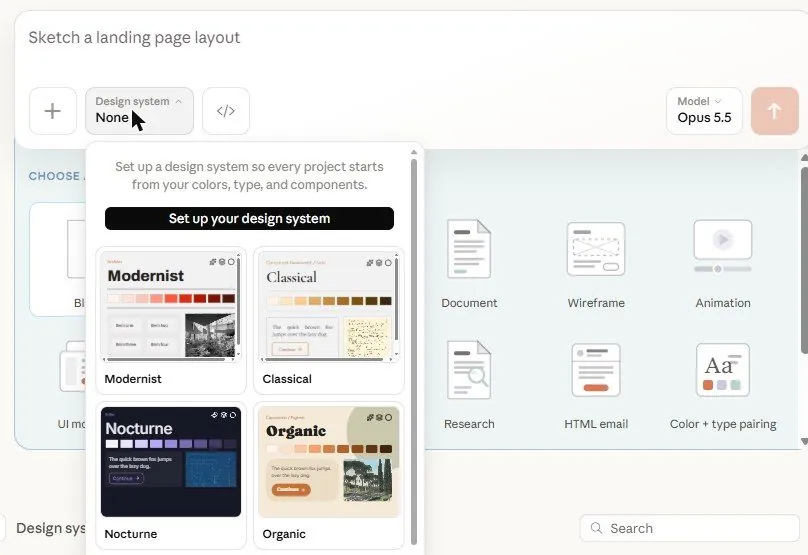
Once a system exists, it appears in that menu and is selected for the design; the result already has your colors and fonts. [Picture pending: a design system created from a website, and a post made with it.]
6Watch out
- One system per brand. Mixing two in one design gives a muddle.
- A system built from your website copies what is there, flaws included. Look through it once and fix the colors or fonts you never liked.
7Go further
Make the system first, then every chapter in this part (slides, prototypes, pages) comes out on brand. Chapter 3.3 is slides.