
1In one sentence
A chat is a running conversation Gemini remembers from top to bottom, and the model menu at the top lets you choose a quicker brain or a deeper one for each message.
2New words
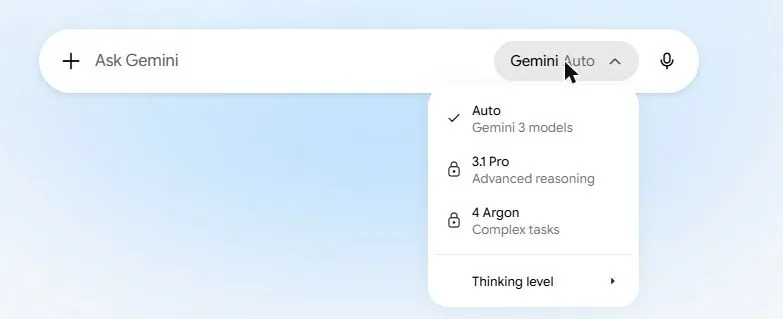
- Model menu — the drop-down at the top of the page (it shows "Auto" or a name like "3.1 Pro"). It changes which version of Gemini answers.
- Auto — when the menu says "Auto", Gemini picks a model for you based on the question. This is what Free accounts use.
- Flash-Lite, Flash — the quick models behind "Auto". Good for everyday questions, rewriting and summaries. Free users get Flash-Lite; Plus adds Flash.
- Pro — the model that "thinks" longer before answering (shown as "3.1 Pro — Advanced reasoning"). Better for math, planning, code and anything with many moving parts. Paid (Pro plan and up).
- 4 Argon — the newest and strongest model (shown as "4 Argon — Complex tasks"), opened to Pro and Ultra subscribers in October 2026. Slower, and uses your limit fastest.
- Thinking level — a small submenu inside the model menu that sets how long the model thinks before answering. Higher is slower and more careful.
- Deep Think — an even slower thinking mode offered to Ultra subscribers on some models. It can take minutes.
3Why you would want it
Most of the time the quick model is enough and you should not touch the menu. But when an answer is shallow, wrong on a calculation, or a plan has holes, switching to Pro (or Argon) and asking again is the single most effective fix. Knowing this saves you from blaming yourself when the tool was simply on its fast setting.
4Try it now
- Open a new chat and click the model name at the top left of the page.
- Read the list. On Free you will see "Auto" plus the Pro and Argon models with a small lock on them; that is expected.
- With the quick model, ask: Sam's Bakery sells 180 croissants a day at 4.50 and the ingredients cost 1.20 each. Rent is 2,400 a month and wages are 5,500. Does it make a profit? Show the math.
- If you have a paid plan, switch to Pro and ask the same thing. Compare.
- Hover over the model names: a short description appears for each.
5What you will see
The model menu open, with each model and one line about what it is for:
The quick model answers at once; Pro shows a "thinking" line for a few seconds first and usually lays the math out more carefully.
6Watch out
- Switching model in the middle of a chat is fine; the new model sees the whole chat. But a very long chat slowly "forgets" early instructions. When answers drift, start fresh.
- Model names changed several times in 2026. If your menu says "3.6 Flash" or "3.1 Pro", that is the version number in front of the family name; the family is what matters.
7Go further
Read Chapter 1.6 to put your own files in front of the model.