
1In one sentence
Claude can make Excel files with live formulas, PowerPoint decks and Word documents that open and behave normally in those programs.
2New words
- Formula — a cell in a spreadsheet that calculates (=SUM, =A2\*B2). A "live" formula recalculates when you change the numbers; a pasted number does not.
- Skill (seen in Chapter 1.11) — here, the built-in Excel, PowerPoint, Word and PDF skills that know how to build proper files.
- Outputs — the panel in a Cowork task that lists the files Claude made, with a Download button.
3Why you would want it
A chat can describe a budget; a file is a budget. The Excel skill writes real formulas and even checks them with sample numbers before handing the file over. The PowerPoint skill builds slides with layouts, not a wall of bullet text. These are files you can send to a colleague who has never heard of Claude.
4Try it now
(paid plans)
- In a new chat, type: Build a monthly budget sheet: categories down the side (rent, food, transport, phone, savings, other), months across the top, a total row and a total column that update when I change a number, and a small chart of totals by month.
- When the file appears under Outputs, click it to preview, then Download and open it in Excel.
- Change one number and watch the totals move.
5What you will see
The preview inside Claude shows the sheet as Excel will show it. This is the planner from Chapter 2.1: bold header, the days, the Week Total row, and a how-to note under the table:
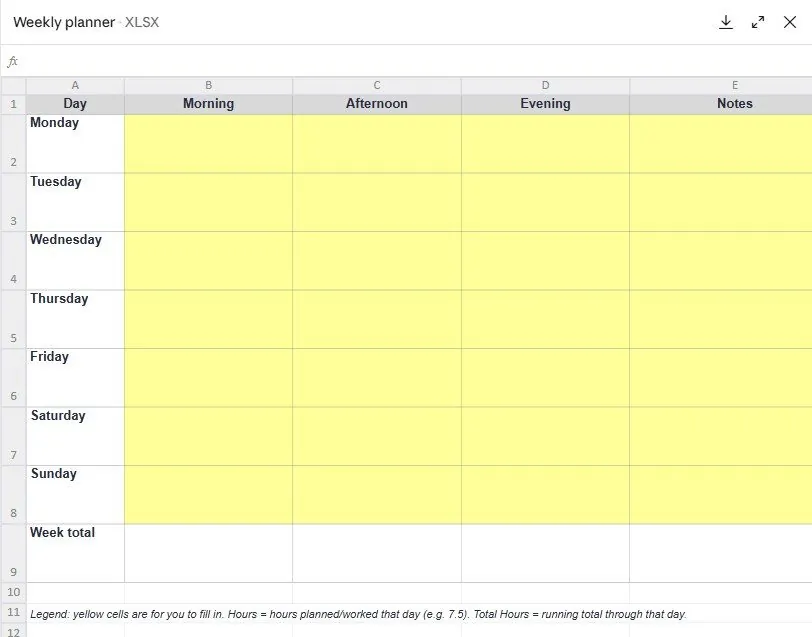
Claude reported "I tested it with sample hours and the sums came out right", and the Hours column only accepts numbers from 0 to 24, a rule Claude added on its own because it is good practice.
6Watch out
- Say which columns and totals you need. Claude fills gaps sensibly, but your layout is better than its guess.
- Open the file once in the real program before sending it. Formulas and charts are right almost every time; "almost" is why you look.
7Go further
Ask for a deck from a document: attach a report and type Make a 6-slide deck from this for a 10-minute update, one idea per slide. Chapter 2.7 is the other way around: Claude working inside Excel and PowerPoint themselves.