
1In one sentence
You can use Claude for free, and paying gives you more messages, smarter versions of Claude, and the helpers that do work for you.
2New words
- Plan — the package you are on: Free, Pro, Max, Ultra, Team or Enterprise. (Names and prices change: in late 2026 "Max 5x" became Max and "Max 20x" became Ultra. Always check claude.com/pricing.)
- Usage limit — how much you can ask Claude before it tells you to wait. Every plan has one; bigger plans have bigger limits.
- Reset — limits refill on a timer (usually every few hours). If Claude says you have reached your limit, it is not broken; it is waiting for the reset.
- Model — the version of Claude's "brain" you are using. Some are quick and simple, some are slower and much smarter. Paid plans unlock the smarter ones.
3Why you would want it
The free plan is the right place to learn: everything in Part 0 and most of Part 1 works there. People upgrade when they hit the limit often, when they need the smartest model for serious work, or when they want Claude to work inside their folders and apps (Part 2).
| Plan | Who it is for | What it adds, roughly |
|---|---|---|
| Free | Learning and light use | Chat, files, web search, memory, creating files, connectors, Claude Design, Slides and Docs, a limit that resets every few hours and every week (tested 2 Nov 2026) |
| Pro | One person using Claude most days | Much higher limit, the smarter models, Projects, handing off bigger tasks (Cowork) and scheduling them, Claude Code, Chrome |
| Max | Heavy daily users and builders | Several times Pro's limit, priority access, early access to new features, monthly API credits for building your own apps (Chapter 6.6) |
| Ultra | The heaviest users | Twice Max's weekly limit, no 5-hour limit for verified accounts (the weekly one still applies), more monthly API credits |
| Team | A small company | More than Pro-level for each person, shared Projects, admin controls, Claude in Slack, monthly API credits shared by the team |
| Enterprise | Large companies | Everything, plus security, contracts and control for IT |
4Try it now
- Open Claude, click your name or profile picture, then Settings.
- Find Plan (or Billing). Read which plan you are on.
- Open claude.com/pricing in a new tab and compare the columns.
5What you will see
Your plan name and what it includes. This is a free account:
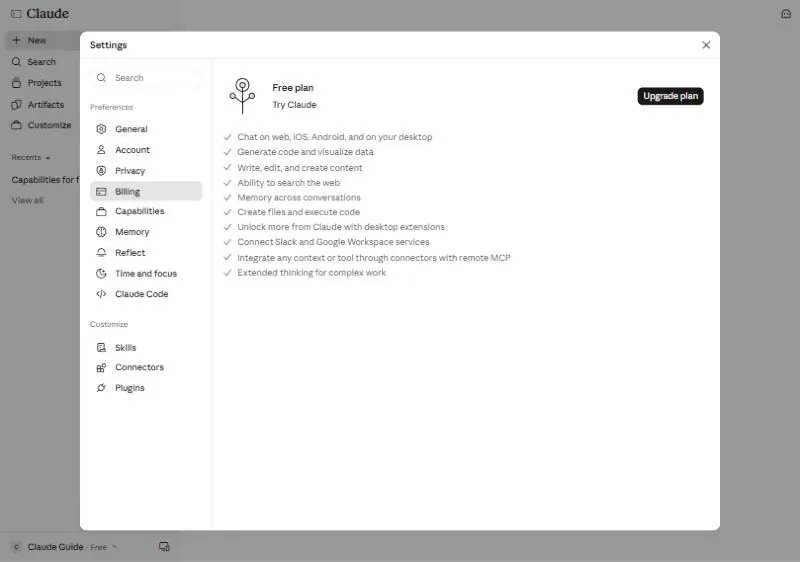
On the pricing page, a side-by-side list of what each plan unlocks.
6Watch out
- A heavy task (a long file, a smart model, a Cowork job) uses more of your limit than a short chat. If you run out quickly, that is why.
- Prices and plan names change. This chapter avoids numbers on purpose; the pricing page is always right.
7Go further
Stay on Free until you finish Part 1. If you find yourself waiting for resets more than twice a week, Pro is the natural next step.