
1In one sentence
You do not install Seedance; you use it through a website or app that rents it, and the main doors for ordinary people are Dreamina (part of CapCut), the CapCut editor on a computer, and Higgsfield, with an API for programmers.
2New words
- Host — a website that gives you a button to run a model it did not make. Several hosts offer Seedance.
- Dreamina — ByteDance's own creative website (dreamina.capcut.com), tied to CapCut. The most direct door to Seedance.
- Higgsfield — an independent video website that offers many models next to tools for characters and ads. Its Video page shows Seedance 2.5 (plus a cheap Draft version and an Edit version); older versions such as 2.0, 2.0 Mini and 1.5 Pro are still reachable through its Claude connector and API.
- API — a way for programs, not people, to talk to a model. Sold by BytePlus (ByteDance's business arm outside China) through a service called ModelArk, and by Volcano Engine inside China.
- Jimeng and Doubao — the Chinese versions of Dreamina and ByteDance's chat app. New Seedance versions appear there first.
3Why you would want it
The door you pick decides the price, the version you get, and the extras around it. Dreamina is the simplest and may give new users some free trial credits (how many changes; check after you sign in). Higgsfield lets you mix Seedance with other models and tools in one place. The API is for people building their own app.
4The map
| Door | Who it is for | Versions seen (Nov 2026) | Good | Less good |
|---|---|---|---|---|
| Dreamina (CapCut) | Beginners | 2.0, 2.0 Mini, 2.5 | Some free trial credits, simple page, Long Video Mode up to 3 minutes on 2.5 | Seedance 2.5 needs an eligible paid plan; models carry Dreamina's own labels ("Dreamina Seedance 2.5") next to other companies' models, so read the names carefully |
| CapCut on a computer | People who already edit in CapCut | 2.5 | AI Video, AI Edit and AI Extend inside the editor, so you make, fix and lengthen clips in one place | Pro or Ultra membership only; credits charged by the second |
| Higgsfield | Hobbyists and small businesses | 2.5, 2.5 Draft, 2.5 Edit on the page; 1.5 Pro, 2.0 and 2.0 Mini through its connector and API | Clear version choice, start frame, references, extend, many lengths and sizes | No free credits; 1080p is the only quality on the page unless you pick Draft |
| BytePlus ModelArk / Playground | Programmers | 2.0 series, 2.5 | Direct, pay per use | Needs an account, keys and reading documentation |
5Try it now
- Open dreamina.capcut.com and sign in (a CapCut or TikTok login works). Click AI Video. Look at the model choice next to the text box.
- Open higgsfield.ai, sign in, go to Video, and open the Model dropdown. Seedance 2.5 is the default; Seedance 2.5 Draft and Seedance 2.5 Edit sit in the same list.
- Note which versions each one shows you today. This guide uses Higgsfield for its pictures because it shows the version names plainly.
6What you will see
On Higgsfield, a list of video models with the Seedance ones side by side:
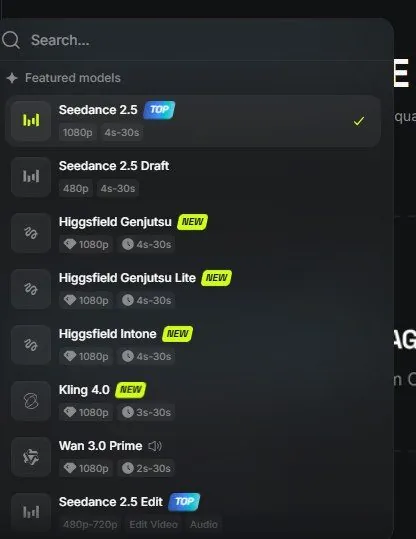
Each version shows its own limits (length, picture size).
7Watch out
- Version names move around. Each host adds its own labels. If in doubt, look for the number (2.0, 2.5).
- "Seedance official website" search results are mostly not official. The maker's page is seed.bytedance.com.
8Go further
Before you spend anything, read Chapter 1.3 on credits so the first clip does not surprise you.