
1In one sentence
Claude can open websites in a browser, read them, click, scroll and fill forms, and it asks you before using each new site.
2New words
- Browser — the program that shows websites (Chrome, Safari, Edge). Claude has its own built-in one on the desktop app, or can use your Chrome (Chapter 2.8).
- Allow once / Always allow — the choice you get the first time Claude wants to use a site. "Always" means it will not ask again for that site.
- Logged-in session — when you are signed in to a site in that browser, Claude can act as you there. That is powerful; grant it site by site.
3Why you would want it
Many things have no connector: a supplier's portal, a government form, a booking site. The browser is the universal connector. Claude reads the page like you would, clicks like you would, and reports back, while you watch.
4Try it now
(paid plans)
- In a new chat, type: Open the website en.wikipedia.org in a browser, go to the Main Page, and tell me the title of today's featured article and the first sentence of it.
- When the card "Allow Claude to use the browser on en.wikipedia.org?" appears, click Allow once.
- Watch it work, then read the answer with its source link.
5What you will see
The permission card appears before Claude touches the site (it is the same card shown in Chapter 2.10). Then "Used the browser", and the answer, with the page linked as a source:
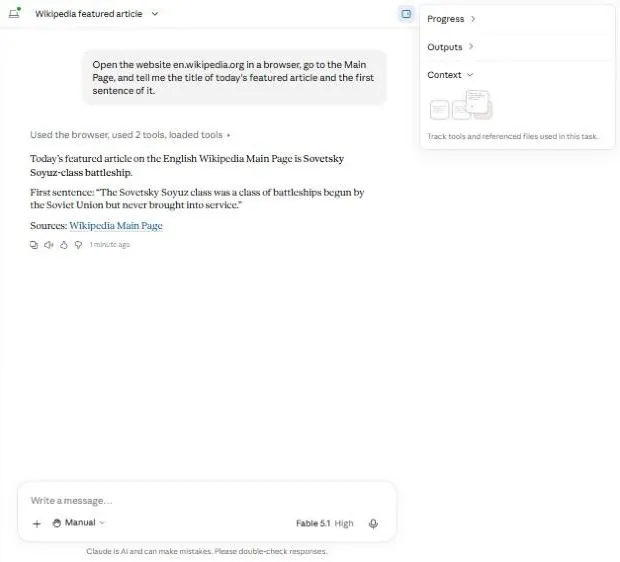
In the test this took about 40 seconds.
6Watch out
- Choose "Always allow" only for sites you want Claude to use freely. For banks, email and anything with payments, keep it at "once", or do it yourself.
- Claude will not solve CAPTCHAs or type your passwords. Sign in yourself first, then hand over the task.
7Go further
Try a real chore: Go to [a shop's site], find [a product], and tell me the price and delivery time, without buying anything. Chapter 2.4 covers programs that are not websites at all.