
1In one sentence
Claude can look at your screen and move your mouse and keyboard, so it can work in programs that have no connector and no website.
2New words
- Computer use — Claude sees a picture of your screen, decides where to click or what to type, and does it. Still marked beta: new and improving.
- Grant an app — you choose which programs Claude may control (for example, only the calculator, or only Excel).
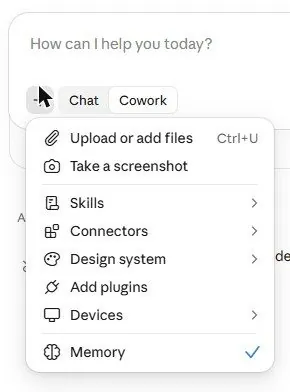
- Take a screenshot — the simplest form: Claude looks at your screen once to understand what you are seeing. It is in the + menu of a Cowork task.
3Why you would want it
Old accounting software, a desktop photo editor, a point-of-sale program: no connector will ever exist for them. Computer use lets Claude do the clicking. It is slower than a connector and you should watch it, but it reaches everything.
4Try it now
(desktop app, paid plans)
- In the desktop app, start a Cowork task and type: Open the calculator app and add 1,284 and 3,917, then tell me the result.
- When asked, turn on computer use and grant only the calculator.
- Watch the cursor move.
5What you will see
On the website, the + menu of a Cowork task already offers "Take a screenshot", which is the look-only version:
In the desktop app, the first full task asks you to turn computer use on and to grant the apps it may touch; then you see the mouse move and the keys typed, step by step. [Picture pending: the desktop app asking to turn on computer use, and Claude clicking in the calculator.]
6Watch out
- It is new and slower than a human. Give it small, clear tasks the first few times, and watch.
- Grant only the apps the task needs. Never grant a banking app or a password manager.
7Go further
Combine with a folder (Chapter 2.2): Open each invoice PDF in this folder in the viewer, read the total, and build me a spreadsheet of totals. Chapter 2.5 shows how to split such jobs between helpers.