
1In one sentence
Deep research is ChatGPT working for several minutes on its own, reading many web pages and writing you a long, organized report with sources, for questions that a single search cannot answer.
2New words
- Deep research — a special mode where ChatGPT plans a research job, searches many times, reads the pages, and writes a report. It takes 5 to 30 minutes.
- Report — the long answer it produces, usually with headings, a summary, and a list of sources at the end.
- Clarifying questions — before starting, ChatGPT often asks you two or three questions to understand what you want. Answer them; the report gets much better.
3Why you would want it
Some questions are too big for one answer: comparing suppliers across a whole country, understanding the rules for starting a small business, or checking what competitors charge. Deep research does the reading a person would do over an afternoon, and shows its sources so you can check. It is one of the most useful tools in ChatGPT, and one of the most limited on cheaper plans.
4Try it now
- Open a new chat and click "+", then choose Deep research.
- Type: Research what a small bakery should know before selling bread at weekend farmers' markets in [your country]: permits, typical fees, insurance, and common mistakes. Give sources.
- Answer the clarifying questions it asks.
- Leave the tab open or come back later. You can keep using other chats in the meantime.
5What you will see
A progress panel showing what ChatGPT is searching and reading, with the number of sources growing:
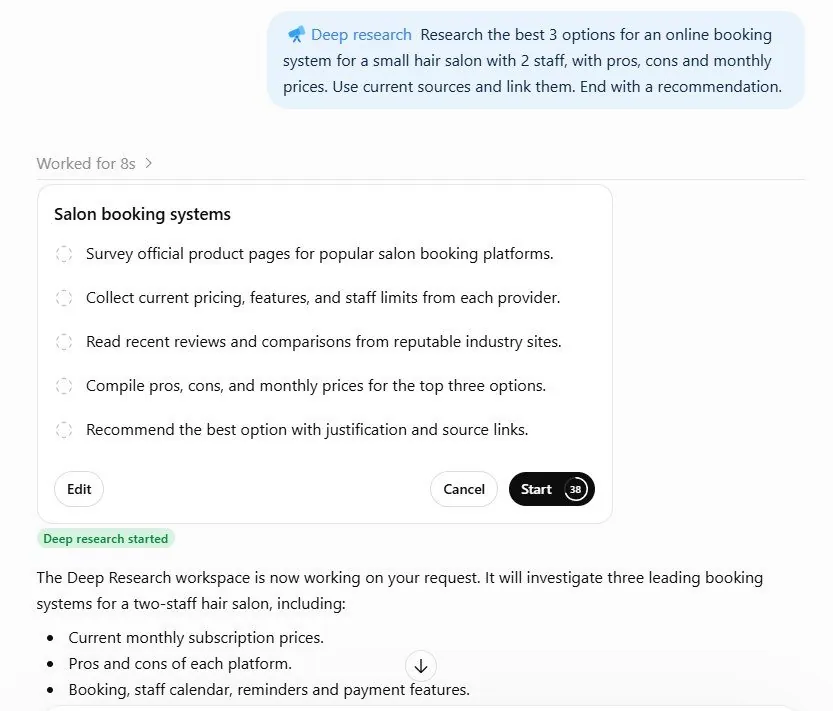
When it finishes, a long report appears with numbered sources at the end. You can ask follow-up questions in the same chat.
6Watch out
- Free and Go get only a handful of deep research runs a month; Plus gets more; Pro gets the most. The exact numbers change, so check the pricing page. Use your runs on questions that really need them.
- A long report with sources still has mistakes. Check the facts you will act on, especially numbers and dates.
7Go further
Ask for the report to be turned into a one-page checklist. Then read Chapter 1.9 for something completely different: making pictures.