
1In one sentence
ChatGPT can search the internet while answering, which means it can tell you about today's news, current prices and recent events, and show you where the facts came from.
2New words
- Web search — ChatGPT looking up live web pages before it answers, instead of relying only on what it learned during training.
- Knowledge cutoff — the date when the model's general learning stopped. For anything newer, it needs to search or read your file.
- Source — the web page a fact came from. ChatGPT shows them as small links or a "Sources" button at the end of the answer.
- Citation — a note that says "this fact came from here". Same idea as a source.
3Why you would want it
Without search, ChatGPT may describe last year's prices or a rule that has changed. With search, it reads current pages and points you to them. That turns a vague "I think" into something you can verify. It is also faster than opening ten tabs yourself, as long as you still click one or two of the sources.
4Try it now
- In a new chat, type: What is the weather forecast for [your city] this weekend, and what is one event happening there?
- Watch for a "Searching the web" line before the answer.
- Now type: What did you search, and which page did each fact come from?
- Click one of the source links to check it.
5What you will see
An answer with small source links inside the text or a "Sources" button at the bottom:
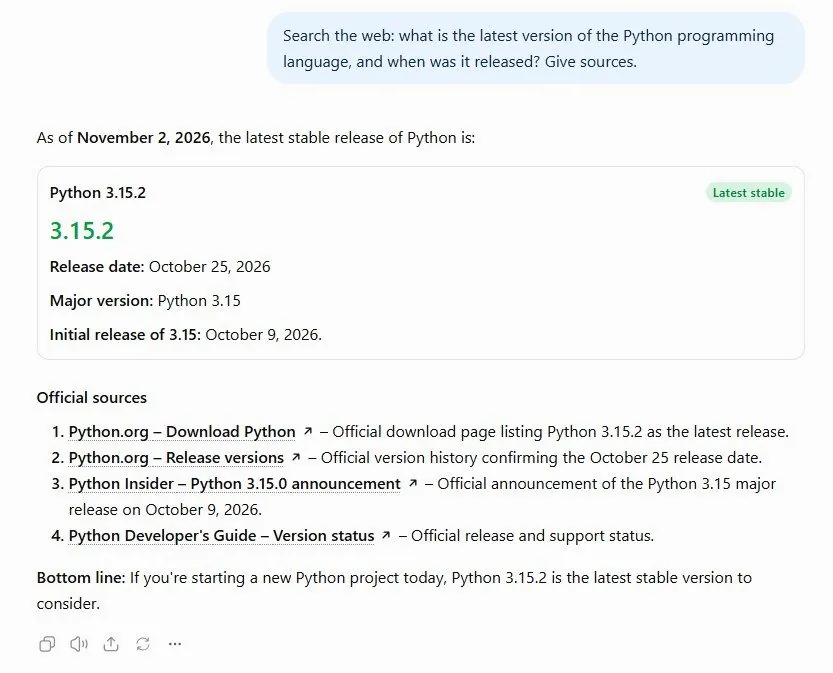
Clicking a source opens the actual page in a side panel or new tab so you can read the original.
6Watch out
- Search is automatic. ChatGPT decides when to look things up, and sometimes it does not when you expected it to. Say Search the web for this if you want to be sure.
- A source link proves the page exists, not that ChatGPT read it correctly. For money, health, law or anything you will act on, open the page.
7Go further
Try: Find 3 recent reviews of [a product you want], give me the pros and cons, with links. When one search is not enough, Chapter 1.8 shows deep research, which reads dozens of pages for you.