
1In one sentence
Describe a picture in words and ChatGPT will draw it, and you can then ask for changes in plain language until it looks right.
2New words
- Image generation — making a picture from a text description. Since September 2026 ChatGPT uses ChatGPT Images 2.5, which is good at readable text inside pictures, works up to 50% faster than before, and changes only the part you ask for.
- Edit — changing an existing picture by asking: new background, different colors, remove an object. You can also upload your own photo and ask for edits.
- Aspect ratio — the shape of the picture: square, wide like a screen, or tall like a phone.
- @Sketch — type @Sketch in the message box to open a drawing area. Draw a rough idea with your finger or mouse, and ChatGPT turns it into a finished picture. For everyone.
3Why you would want it
A poster for a sale, a social media picture, a birthday card, a logo sketch, a diagram to explain an idea. ChatGPT is not a professional designer, but for everyday pictures and quick drafts it is often good enough, and it saves you hours in drawing programs you do not know.
4Try it now
- In a new chat, click "+" and choose Create image, or simply type: Create an image of a warm, cozy bakery window at sunrise with a chalkboard sign that reads "Sam's Bakery, fresh at 7". Square, photo style.
- Wait; pictures take longer than text.
- Reply: Make the sign bigger and change the sky to evening.
- Hover over the picture and click the download icon to save it.
5What you will see
The picture appears inside the chat, drawn gradually from top to bottom:
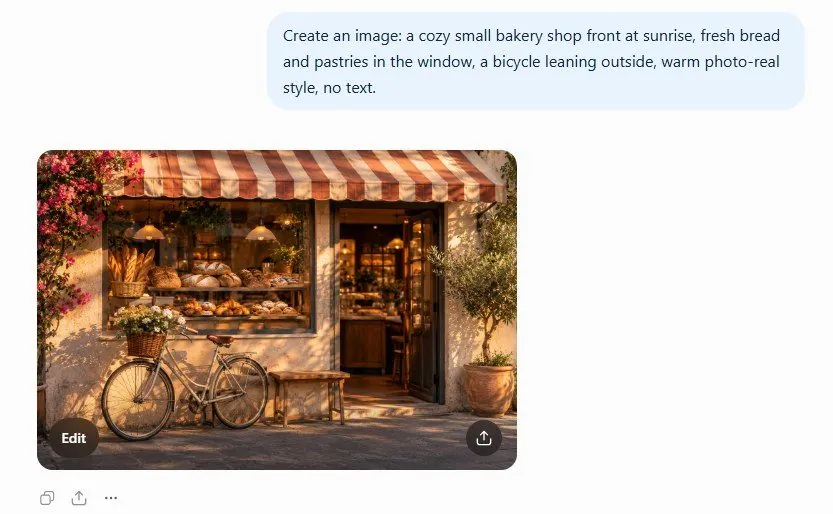
After your follow-up, a second version with your changes, usually keeping the rest the same.
6Watch out
- Free accounts get only a few pictures a day, and when the service is busy they may wait or be refused. Paid plans get more; Pro gets the most.
- Text inside pictures is much better than it used to be but still comes out wrong sometimes. Check every letter before you print or post. ChatGPT will also refuse some requests (real people, brands, violent scenes).
7Go further
Upload a photo of your own product and ask: Put this on a plain white background with soft shadow. Then read Chapter 1.10 to work on longer writing side by side with the chat.