
1In one sentence
When you ask for something long, like an article or a piece of code, ChatGPT puts it in its own editable block beside or inside the chat, so you can change parts of it without rewriting the whole thing.
2New words
- Canvas — the name ChatGPT used for its side-by-side editor from 2024 to mid-2026. In 2026 it was folded into the chat as "writing blocks" and "code blocks". If you ask ChatGPT to "open a canvas" today, it replies that Canvas has been replaced by newer writing and editing features, and gives you a writing block instead. Older guides still say Canvas.
- Writing block — a long draft shown as a document inside the chat. You can type in it directly, select a sentence and ask for a change, or open it full screen.
- Code block — the same idea for computer code, with a button to run some code and a preview for small web pages.
- Expand — the icon that opens a block full screen, beside the chat, which is where "Canvas" lives today.
3Why you would want it
In normal chat, every change means ChatGPT rewrites the whole answer and you scroll to find what moved. In a block, you point at one paragraph and say "shorter", and only that paragraph changes. You can also download the result as a Word file or PDF, which is handy for letters, articles and reports.
4Try it now
- In a new chat, type: Write a 300-word article for a local newsletter about why fresh bread tastes better in the morning. Put it in a document.
- When the draft appears as a block, click the Expand icon to open it beside the chat.
- Select one paragraph, choose Ask for changes, and type: Make this half as long.
- Click Download and pick PDF or Word.
5What you will see
The document open on the right with the chat on the left, and your selected paragraph changed while the rest stayed put:
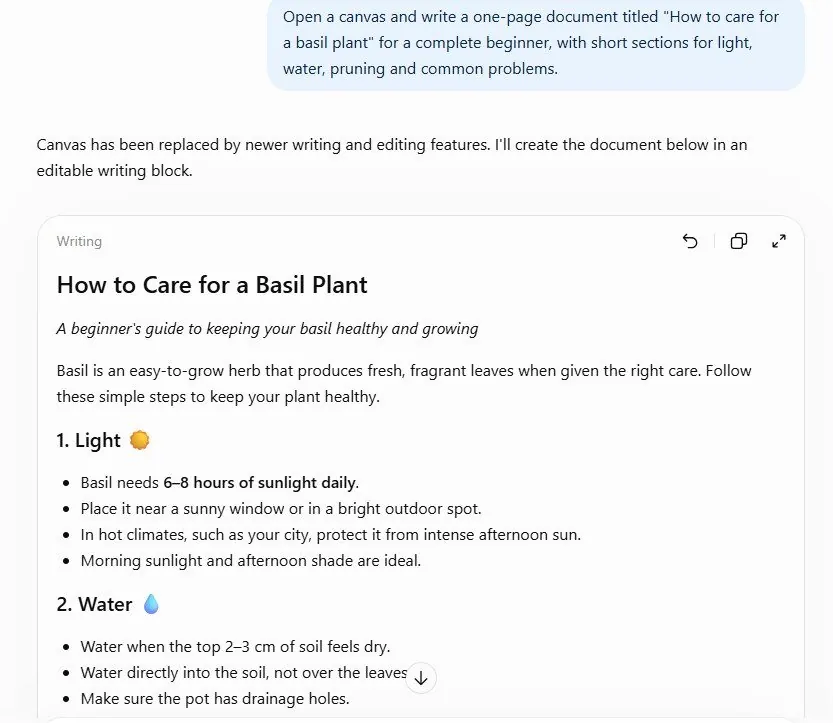
Undo and redo arrows let you step back if a change made it worse.
6Watch out
- The exact buttons differ by plan, device and app version, and this feature changed names in 2026. If you cannot find "Canvas", look for Expand on any long answer.
- Formatting is basic: headings, bold, lists. For a polished layout, download the file and finish it in Word or Google Docs.
7Go further
Ask: Rewrite this for a 10-year-old and compare versions with the arrows. Then read Chapter 1.11 to keep related chats and files together in a Project.