
1In one sentence
You decide what ChatGPT keeps and learns from, a temporary chat leaves no trace in your history or memory, and every answer that matters should be checked before you act on it.
2New words
- Temporary chat — a chat that is not saved in your history, does not add to memory and is not used for training. It can still read your existing memory, plugins and custom instructions; the notice on screen says so. Turned on with the dotted speech-bubble icon at the top right of a new chat. Since late August 2026 you can also choose to save one if it turns out useful.
- Training — OpenAI using chats to improve future models. On Free, Go, Plus and Pro this is on by default; you can switch it off under Settings, Data controls. Business and Enterprise never train on your data.
- Data controls — the settings page for training, chat history export and deletion.
- Hallucination — when ChatGPT writes something that sounds right but is made up: a fake statistic, a law that does not exist, a book that was never written.
- Locked chat — a saved chat you hide from your history, sidebar and search. It opens only with a 4-digit PIN, or Face ID or your phone's screen lock. Open the chat, tap the three dots, then Lock chat. Rolling out to all plans since October 20, 2026. If you reset the PIN, your locked chats are deleted for good.
3Why you would want it
ChatGPT is useful because you tell it real things: your contract, your symptoms, your numbers. Knowing which switch keeps those private, and checking before you act, lets you use it fully without regret.
4The checklist
- Private topic? Start a temporary chat, or lock a chat you want to keep but hide.
- Not happy with training? Settings, Data controls, turn off "Improve the model for everyone".
- A number, date, name, law or price you will act on? Ask Where does this come from? and open the source.
- Medical, legal or money decision? Treat the answer as a starting point for a professional, not a replacement.
5Try it now
- Open a new chat and click the temporary chat icon at the top right. Notice the page changes color and shows a notice.
- Ask something you would rather not keep: How do I politely decline a wedding invitation?
- Close it. Check your chat list: it is not there.
- In a normal chat, ask: Give me 3 statistics about bread consumption in Europe, with sources. Open each source. Note which ones hold up.
6What you will see
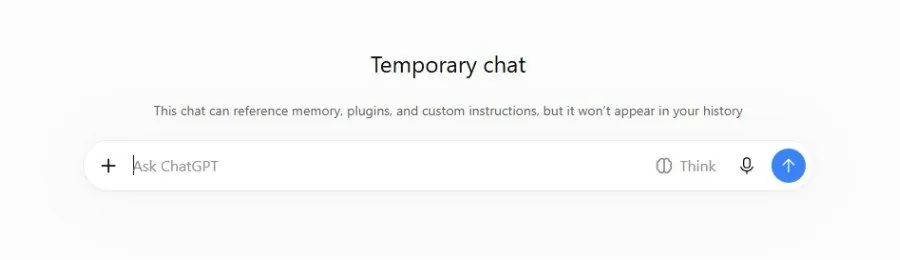
The temporary chat with its darker look and a note that it can reference memory, plugins and custom instructions but will not appear in your history, and that a copy may be kept for up to 30 days:
In step 4, ChatGPT will usually find real sources, but sometimes a number is rounded or a page does not say what it claims; that is the lesson.
7Watch out
- Temporary chats may still be kept by OpenAI for up to 30 days for safety checks, and they can see what memory already knows about you. They are private from your history, not invisible. The same goes for locked chats: they hide chats from people who see your screen, but they are not encrypted and OpenAI keeps them like other chats.
- The browser extension and Work mode can see pages and files you open. Close private tabs before using them, and read every permission request in the desktop app.
8Go further
Pick one answer from this part that you acted on and verify it fully. Make that a habit, and you have learned the most important thing in this guide.