1In one sentence
A Gem is a saved set of instructions (and files) that turns Gemini into a specialist you can reopen any time, and in late 2026 Gems are being replaced by a newer idea called Skills.
2New words
- Gem — a custom version of Gemini with a name, a job description and optional files. Example: "Bakery copywriter: always friendly, under 80 words, mention pre-orders."
- Skill — the replacement. A reusable instruction you call up by typing / (or @; the gray hint in the message box tells you which) and its name in any chat, or that Gemini applies on its own when it fits. Several can run at once.
- Instructions — the text that tells the Gem or Skill who it is and what rules to follow.
- Migration — Google automatically converting your Gems into Skills. The Gems page itself says "Gems will become skills starting Nov 17, 2026" for personal accounts; work and school accounts keep Gems until 2027.
3Why you would want it
Chapter 1.16 will teach you to write a good brief. A Gem or Skill is that brief, saved. Instead of typing "you write for Sam's Bakery, warm tone, short, British English, never promise delivery times" every morning, you type it once.
4Try it now
- In the left sidebar, look for Gems (it may say Explore Gems). Click it.
- Try one of Google's ready-made ones (for example a brainstorming or writing helper) to see the idea.
- Click New Gem. Name it Bakery copywriter. In Instructions, type: You write social posts and emails for Sam's Bakery. Warm, short, under 80 words, plain language. Always end with how to pre-order. Ask me one question if you are missing a detail.
- Save, open it, and type: Post about Friday's new cinnamon rolls.
- Now click Customize in the left sidebar (under More if you do not see it), then Skills, then Create, then Create manually. Name it bakery-copywriter (skill names use small letters and hyphens) and paste the same instructions. Test it in a new chat by typing / (or @) and picking it.
5What you will see
The Gems page, with Google's premade Gems above and your own below, plus a New Gem button:
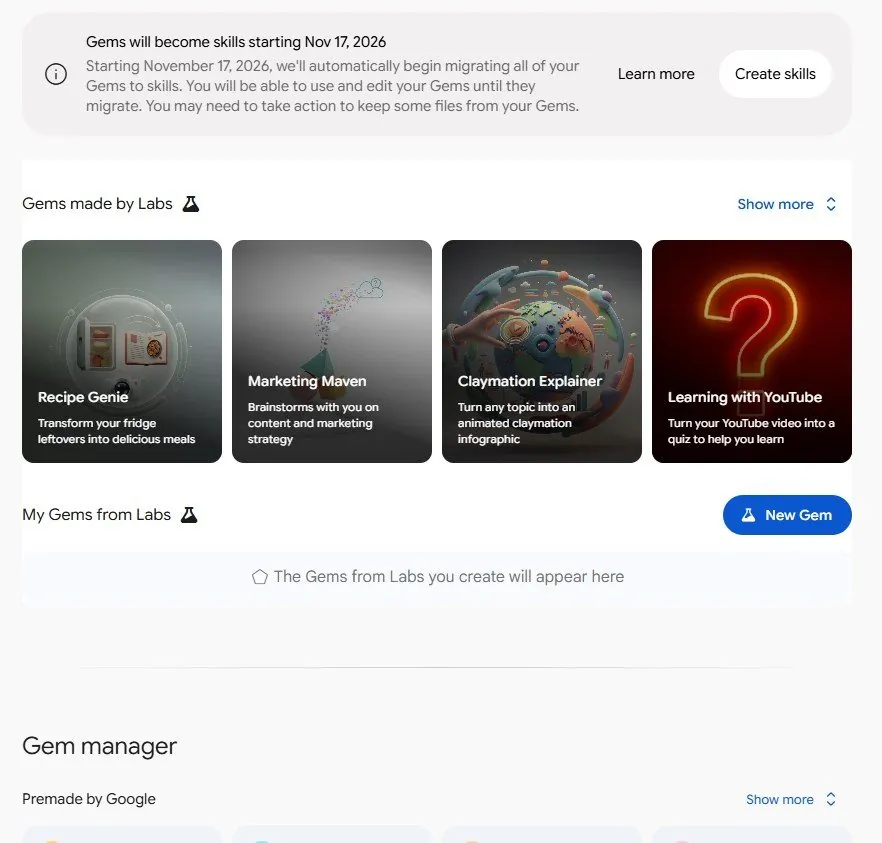
When your Gem answers, it keeps the tone and the pre-order line without being told.
6Watch out
- This is changing right now. Depending on the week, you may see Gems, Skills, or both. Skills began rolling out on October 13, 2026 and work without a paid plan; you must be 18 or over and have Keep Activity on. On personal accounts, Gems become read-only on November 17, 2026, are turned into skills automatically (instructions and supported files carry over), and are removed on December 17, 2026. Download any files you attached to a Gem before then, to be safe.
- Skills do not yet work with Canvas, Deep Research, video or music making, and there is no sharing link yet. If you shared Gems with colleagues, that stops until Google adds sharing.
7Go further
Read Chapter 1.13 to use Gemini inside Gmail and Docs, where a Gem or Skill can also be called.