1In one sentence
Canvas opens a second panel next to the chat where Gemini writes a document or builds a small app, and you edit it together instead of scrolling through chat messages.
2New words
- Canvas — the side panel for working on one thing (a document, a slide deck, a web page, a small program). Found in the + menu.
- Select & ask — highlight some text in Canvas and tell Gemini what to change in just that part.
- Preview — for an app, the running version you can click; for a doc, the formatted page.
- Version — Canvas keeps earlier states. Previous/Next Version moves between them.
- Export — send the result to Google Docs, Slides, or copy it out.
- File in chat — since October 29, 2026, Gemini can also make or edit a document, slide deck, spreadsheet or PDF right in the chat, without opening Canvas. Open the file full screen to type changes yourself, or select text and ask Gemini to change it. Most formats work on the web only; PDFs also work in the phone app.
3Why you would want it
In a chat, every change produces a new copy and you lose track. In Canvas, there is one document that improves. It is where you write the newsletter, the price list, the job ad, the shop policy, and where a non-programmer can make a tiny working tool (a tip calculator, a quiz, a sign-up form) without knowing how.
4Try it now
- Click + under the message box and choose Canvas.
- Type: Write a one-page "Welcome to Sam's Bakery" page for new customers: our story in 3 lines, opening hours, how to pre-order, and a friendly sign-off.
- When it appears on the right, highlight the opening-hours line and type in the small box: Make this a two-column table.
- Use the Change tone or Change length buttons at the top to try "more casual".
- Click Share & export, then Export to Docs.
- Now start a new Canvas and type: Build a simple web page where a customer picks 1 to 12 pastries from a list and sees the total price. Click Preview.
5What you will see
The chat on the left and the Canvas panel on the right, with a toolbar for headings, tone and length, and a Code / Preview switch for apps:
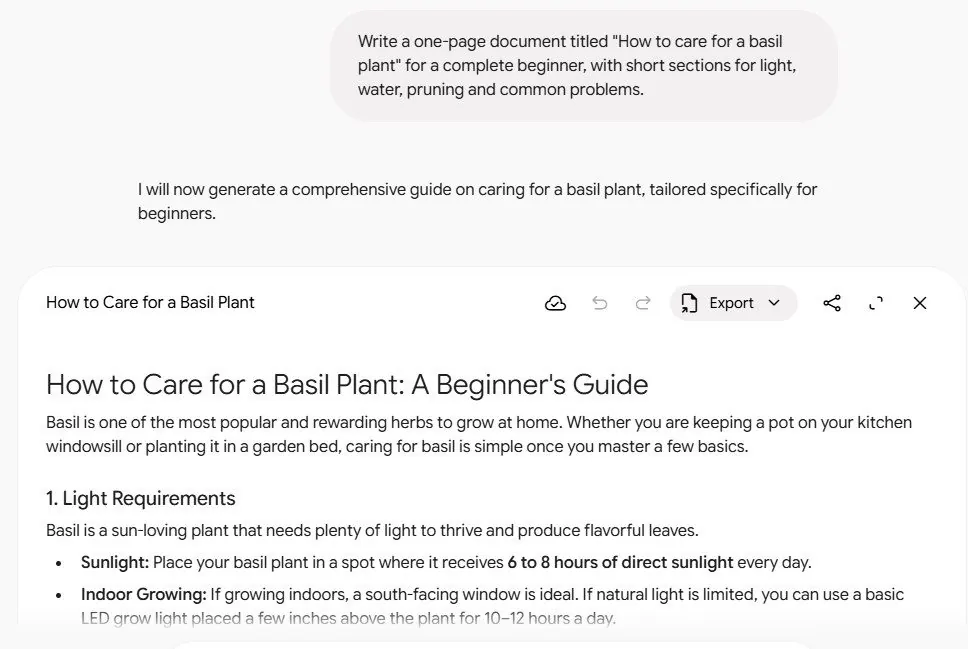
Changes save on their own, and the Create menu can turn the doc into a quiz, infographic, slide show or Audio Overview.
6Watch out
- Sharing an app with the public link lets anyone with the link see and edit its data. Share documents freely; think before sharing apps.
- Canvas is better on a computer. Shared Canvas links open only in a browser, not in the phone app, and editing on a small screen is clumsy.
7Go further
Read Chapter 1.12 to save your favorite instructions so you never retype them.