
1In one sentence
The model picker is the most important dropdown on the site, and each engine is good at something different, so choose by the job, not by the name.
2New words
- Image-to-video — giving the model a picture to start from, instead of only words. Almost every video model can do it.
- Start and end frame — two pictures: where the clip begins and where it ends. The model fills the movement between them.
- Reference-to-video — giving several pictures (a person, a product, a place) and asking the model to use all of them.
- Kling — a video model from Kuaishou, a Chinese company. Wan — Alibaba's video model. Genjutsu — Higgsfield's own tool that copies movement from a reference clip or swaps objects, places, products or characters in one. Intone — Higgsfield's talking-head model: the lips match the words and the voice stays the same from clip to clip.
3Why you would want it
The Video page keeps its list short. On November 2, 2026 it showed Seedance 2.5 (1080p, 4 to 30 seconds), Seedance 2.5 Draft (480p), Higgsfield Genjutsu, Genjutsu Lite, Intone, Kling 4.0 (Higgsfield's changelog says 3 to 30 seconds; check the picker), Wan 3.0 Prime (2 to 10 seconds) and Seedance 2.5 Edit. Many more engines (Google Veo 3.1, Kling 3.0, Seedance 2.0, Grok, MiniMax and others) exist on the site through presets, the studios, the MCP connector and the API, but the beginner's choice is among the eight on the page. The table below is enough for a good first choice.
| Job | Try first | Why |
|---|---|---|
| A realistic person doing one thing | Seedance 2.5 | Steady motion, keeps faces, has sound |
| Cheap test before the real one | Seedance 2.5 Draft | 480p, lowest cost; finish the good one at 1080p later |
| Several shots in one clip | Seedance 2.5, Kling 4.0 | Write the shots in order; up to 30 seconds on Seedance 2.5 |
| Start picture and end picture | Seedance 2.5, Kling 4.0, Wan 3.0 Prime | Accept both frames |
| Same product in several scenes | Seedance 2.5 with References, Kling 4.0 | Built for identity and multiple references |
| Clip with your own voice recording | Higgsfield Intone | A picture plus a voice file gives a talking person, up to 30 seconds of speech |
| Copy a movement from a real video | Genjutsu, Genjutsu Lite | Motion from a reference clip, applied to your picture |
| Change something in an existing video | Seedance 2.5 Edit, Kling 4.0, Genjutsu | Edit rather than create; Genjutsu swaps a product, place or character |
One fact older help pages still get wrong: Sora is gone. OpenAI closed the Sora app and website on April 26, 2026 and switched off the last part, its developer API, on September 24, 2026. It is not in the menu; if a tutorial tells you to use Sora, pick another model.
4Try it now
- Open Video, click the Model dropdown, and read the whole list once. Note the length and resolution shown next to each, and any "Unlimited" badge for your plan.
- Pick Seedance 2.5 Draft and run the bread prompt from Chapter 1.4 at 5 seconds.
- Pick Kling 4.0 and run the same prompt. Compare the two clips in Assets.
5What you will see
The open model picker, with each engine's name, resolution and length range:
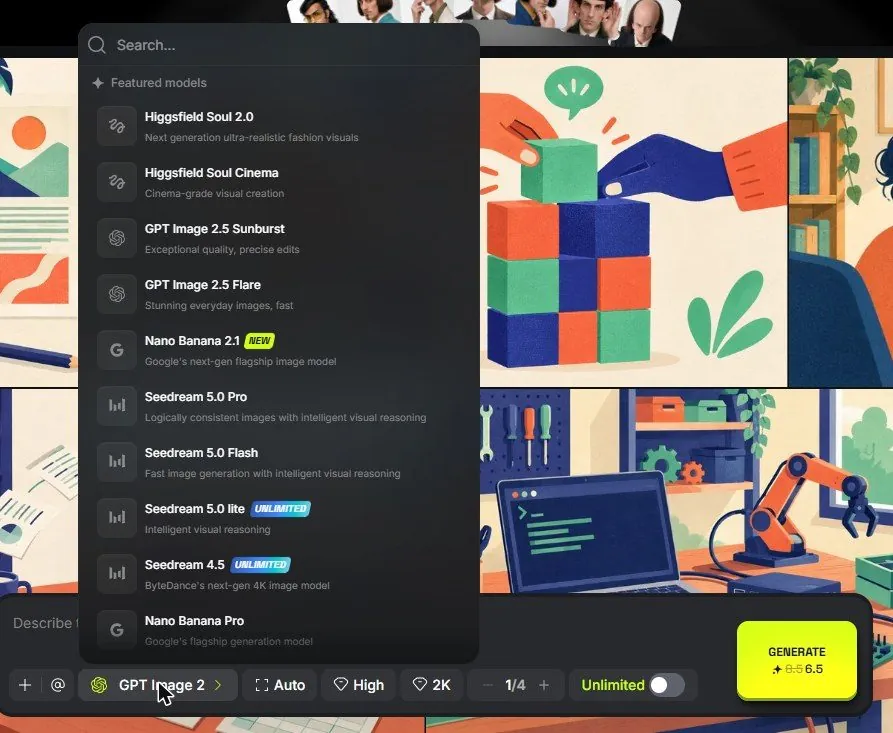
Same words, two engines, two visibly different clips.
6Watch out
- A new version of a model becomes the default automatically. If your results suddenly change, check which version you are on.
- Higher-quality modes on some models are locked behind Plus or above. The picker shows a lock.
7Go further
Keep a note of the two engines you liked. Then read Chapter 1.6 to stop typing camera words and start clicking them.