
1In one sentence
The studios are packaged workflows where you give one input (a link, a clip, a question, a story or game idea) and Higgsfield chains several models together to produce a finished thing.
2New words
- Brand kit — your logo, colors, fonts and tone, saved once and reused by the ad tools.
- UGC — "user-generated content": videos that look like a customer filmed them on a phone. Ads in this style are common on TikTok and Reels.
- Faceless video — a story video with a voice-over and generated scenes, but no on-camera person.
- Playable — a small game or an ad that the viewer can actually play.
3Why you would want it
Each studio replaces a chain of ten manual steps. The trade-off is less control: you get what the template decides. Good for volume; less good when you need one specific shot.
4The map of the studios (November 2026)
| Studio | You give | You get | Note |
|---|---|---|---|
| Ads Studio | A website link (or a brand kit by hand) and products | Up to 20 still ads per product, copy included | Still pictures only, not video |
| Marketing Studio | A product photo or link, a template | Product shots, UGC-style ad clips, posters | Hooks and settings for UGC formats |
| Shorts Studio | Your own short clip (the page shows the length limit) and a style preset | A restyled 9:16 or 16:9 short, motion kept | No timeline; the preset decides the cuts |
| Content Factory | A "What if…" question and a preset (or a TikTok or Instagram link) | A faceless 9:16 story video, 15 s to 5 min, with voice-over | One to four episodes per run |
| Cinema Studio 4.0 | A prompt plus up to 50 reference pictures, clips or sounds | A scene up to 30 seconds with camera, lens, lighting, pacing, genre, era and color controls | The most control, the steepest learning curve |
| Intone and lipsync tools | A picture (or your AI Influencer character) and a voice recording | A talking-head clip, up to 30 seconds of speech, same voice every time | Found in the Video model list and Edit Video tab |
| Mangaka | An idea or your own script, plus reference pictures | A manga, comic or webtoon, in color or black and white, 4 to 30 chapters | New in November 2026; 14 languages |
| Playable | A description of a game | A 2D or 3D game you can test | Playable Games is on all plans; Playable Ads is Enterprise only |
| Katana | A reference video and your own photos | The reference rebuilt with your products or people | Also runs through Claude (Chapter 1.12) |
5Try it now
- Open Ads Studio. Paste a website address and click Create my brand. Review the colors and tone it found.
- Pick one product, set the number of ads to 3, read the credit cost, and Generate.
- Open Shorts Studio, upload a 20-second phone video, pick the Bold Caption preset, choose 9:16, Generate.
6What you will see
A studio page is a form, not a prompt box: upload slots, a preset wall, a few dropdowns and a cost line:
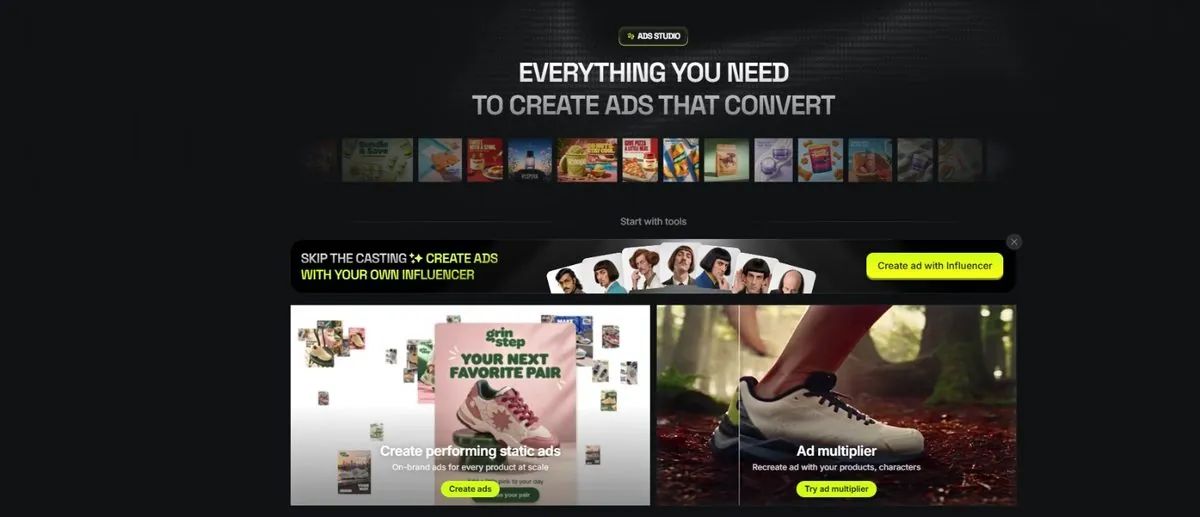
The results appear in a grid you can review and download.
7Watch out
- Studios spend credits in batches. "20 ads per product" adds up; start with 3.
- UGC-style ads with invented "customers" may need a disclosure where you advertise. Check the platform's rules.
8Go further
Build your brand kit once; every studio reuses it. Then read Chapter 1.11 to finish and download your clips.