
1In one sentence
You can give Claude standing rules once, and every answer after that follows them, in every chat, without you asking again.
2New words
- Instructions for Claude — a text box in Settings where you write how you want Claude to behave. Some people call this "custom instructions" or a "system prompt".
- Standing rule — something that is true every time: "short answer first", "use plain words", "I am a nurse, assume I know medical terms".
3Why you would want it
If you find yourself typing "keep it short" or "explain the jargon" in every chat, that is a standing rule. Written once in Settings, it shapes every answer. Combined with Projects (per topic) and memory (facts about you), this is how Claude starts to feel like it was made for you.
4Try it now
- Click your name at the bottom left, Settings, then Account.
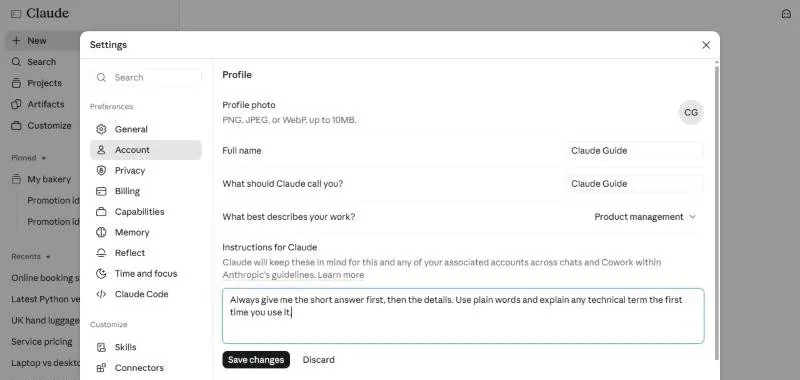
- Find "Instructions for Claude". Type: Always give me the short answer first, then the details. Use plain words and explain any technical term the first time you use it. Click Save changes.
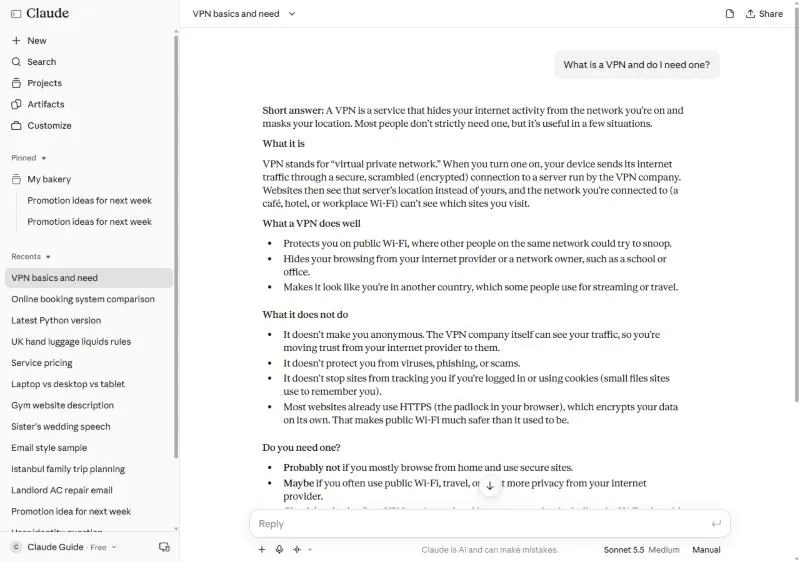
- Open a new chat and ask something you do not fully understand: What is a VPN and do I need one?
5What you will see
The Instructions for Claude box in Settings, with the rule typed in and a Save changes button:
The VPN answer then begins with "Short answer:", explains what the term stands for, and gives the details. You did not ask for that shape in the chat; the instructions did:
6Watch out
- Three or four clear rules work. Twenty rules fight each other and Claude starts ignoring some.
- Instructions set a default, not a cage. Ask for a long answer in a chat and you get one; the rule applies when you say nothing.
7Go further
Add one rule about you ("I run a small shop; prefer practical examples") and one about format ("use tables for comparisons"). Project instructions (Chapter 1.5) add to these inside a Project; they do not replace them.