
1In one sentence
When you ask for a document, a slide deck, a table or a small app, Claude builds it as a real thing beside the chat that you can edit, export and share.
2New words
- Artifact — anything Claude makes that lives outside the chat bubble: a document, a deck, a spreadsheet, a design, a dashboard, a small app. It opens in a panel on the right.
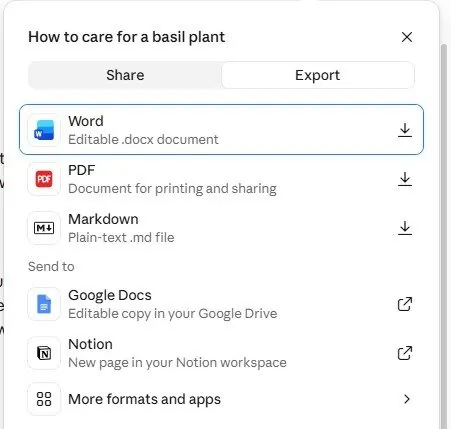
- Export — download the artifact as a file for another program: Word, PDF, PowerPoint, or send it to Google Docs or Notion.
- Doc, Slides, Design — the main artifact types. Type / in the chat box to see them.
3Why you would want it
A chat answer is something you copy and paste and fix. An artifact is the finished thing: a document with headings, a deck with slides, a sheet with formulas. You can edit it in place (click and type), ask Claude to change one part, and export it to the format your boss or client expects.
4Try it now
- Open a new chat and type: Make me a one-page document titled "How to care for a basil plant" for a complete beginner, with short sections for light, water, pruning and common problems.
- Watch the panel open on the right and fill in, section by section.
- Click into the document and change a word yourself. Then ask in the chat: Make the water section shorter.
- Click Export at the top right and choose Word or PDF.
5What you will see
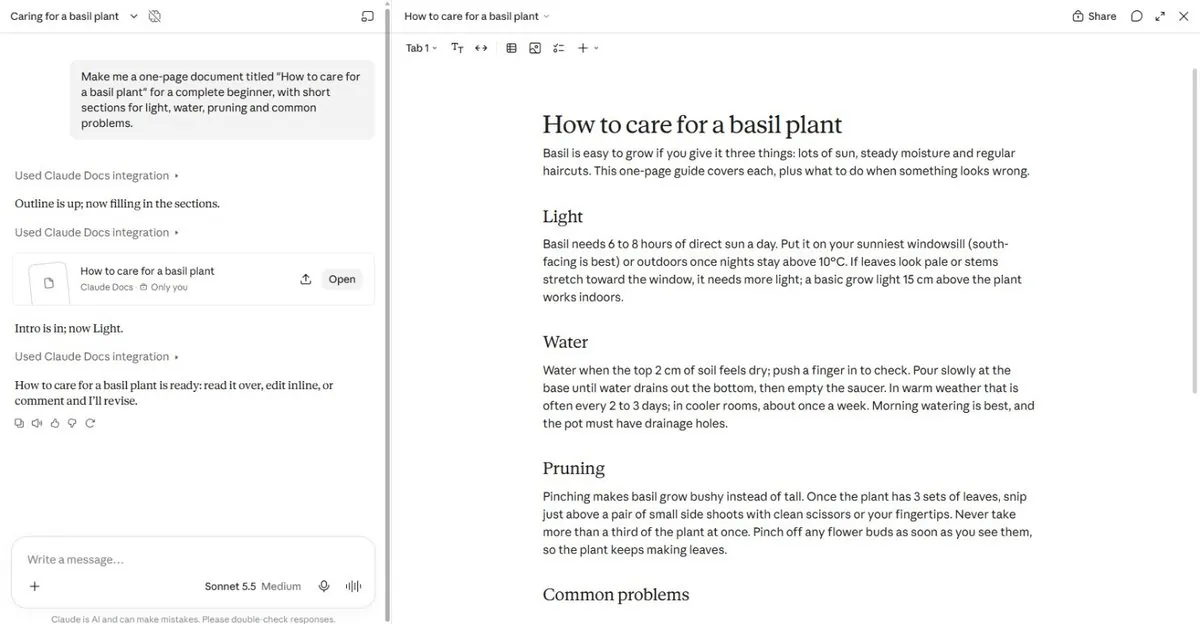
Claude says "Outline is up; now writing the light section", and the document grows on the right while it works. When it finishes, the panel is a real editor you can type in:
The Export menu offers Word, PDF, Markdown, Google Docs and Notion. On the free plan, sharing a link is not included, but exporting is:
6Watch out
- Say what kind of thing you want: "a document", "a 6-slide deck", "a spreadsheet". Without that, you get a chat answer.
- Write the content first, design second. A deck made from a good brief looks better than a deck you keep re-styling.
7Go further
Type / in the chat box and pick Slides: A 6-slide deck introducing [my service] to a new client. Then Chapter 3 (Claude Design) shows how to make these on brand.