
1In one sentence
Claude can keep a small notebook about you between chats, so you stop repeating yourself, and you decide whether it is on and what is in it.
2New words
- Memory — facts Claude keeps from one chat to the next: your name, your job, how you like answers. It is separate from the chat itself and from Projects.
- Generate memory from chats — the switch that turns memory on. On Free, Pro and Max it is on by default; on Team and Enterprise it stays off until you (or your admin) turn it on.
- Sensitive topics — health, religion, politics and similar. A second switch decides whether Claude may remember those at all.
3Why you would want it
Without memory, every new chat starts from zero (Chapter 0.5). With memory on, Claude slowly learns the durable things: you run a bakery, you prefer short answers, you write in British English. The answers get more personal without you typing your life story each time. And unlike a Project, memory follows you into every chat, including the bigger Cowork tasks (Part 2): it is the same memory in both.
4Try it now
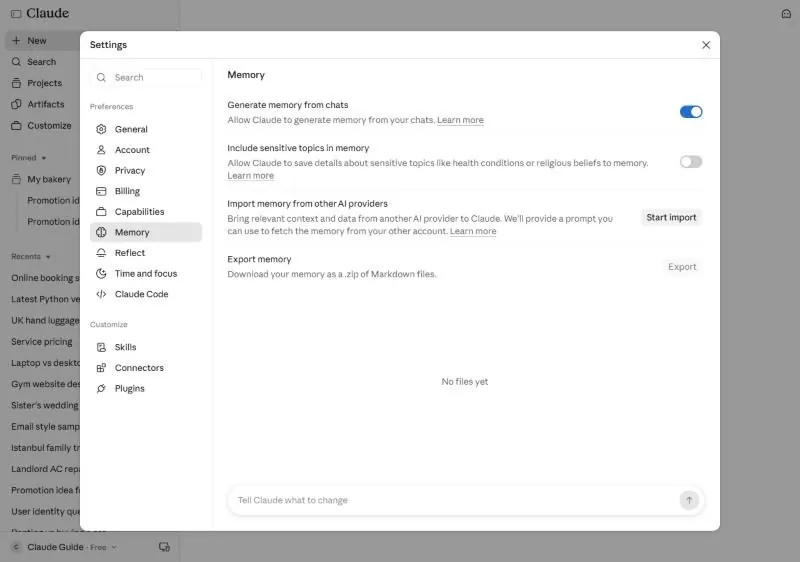
- Click your name at the bottom left, then Settings, then Memory.
- Check that "Generate memory from chats" is on (turn it on if not). Leave "Include sensitive topics" off unless you have a reason.
- In a new chat, tell Claude two durable things: Remember that I run a small bakery and that I like short answers.
- Tomorrow, in a fresh chat, ask: What do you remember about me?
5What you will see
The memory page shows the two switches, a button to import memory from another AI assistant, a button to export yours, and the list of what Claude has saved, grouped under Topics (empty at first). The box at the bottom, "Tell Claude what to change", lets you edit or delete memories in plain words:
6Watch out
- Memory is selective, not a recording. It keeps durable facts, not every detail of every chat. Put must-know facts in a Project (Chapter 1.5) as well.
- You can tell Claude to forget something at any time: Forget that I mentioned my old job. Check the list every few months.
7Go further
If you are moving from another AI assistant, use "Import memory" so Claude starts with what the other one knew. Then read Chapter 1.7 for rules you set once and that apply everywhere.