
1In one sentence
For a big question, Claude does not just search once; it makes a plan, runs many searches, checks the facts, and writes you a report with sources.
2New words
- Research — a multi-step search: plan, search several times, compare, verify, write. It takes minutes, not seconds.
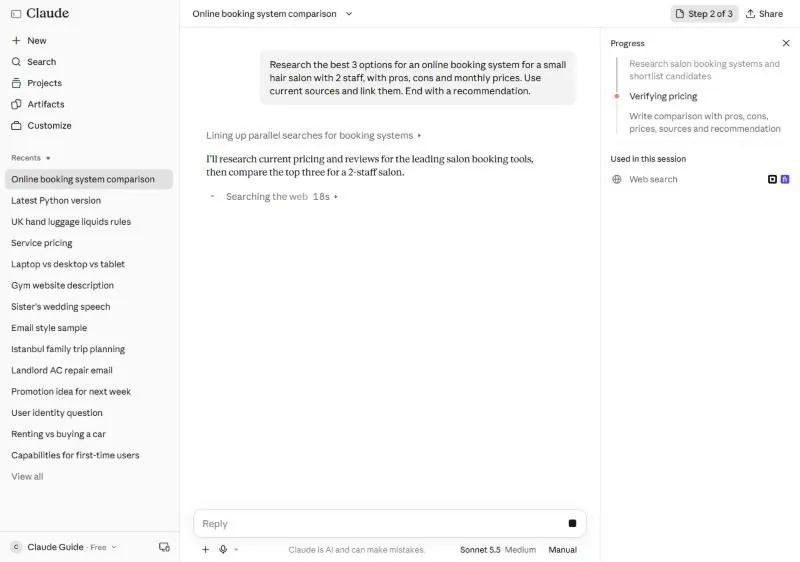
- Progress panel — the box on the right that appears during long tasks, listing the steps and ticking them off.
- Parallel searches — several searches at the same time instead of one after another. Faster and wider.
3Why you would want it
"Which booking system should my salon use?" is really ten questions: what exists, what it costs, what users complain about, what fits two staff. Doing that yourself is an evening of tabs. Asking Claude to research it gives you a comparison with prices and links in a few minutes, and you can then ask follow-ups about the two you like.
4Try it now
- Open a new chat. You can type /deep-research first to call the research skill by name, or simply write a research request with four parts: the goal, the criteria, "use current sources and link them", and the ending you want. For example: Research the best 3 options for an online booking system for a small hair salon with 2 staff, with pros, cons and monthly prices. Use current sources and link them. End with a recommendation.
- Watch the progress panel on the right. Do not close the chat; it keeps working.
- When it finishes, click two of the source links and check the prices.
5What you will see
Claude turns your request into a plan (research and shortlist, verify pricing, write the comparison) and shows it in a progress panel on the right while it runs the searches in parallel:
Then it writes the comparison: which tools it ruled out and why, the three that remain, each with price for two staff, pros and cons, sources, and a recommendation at the end:
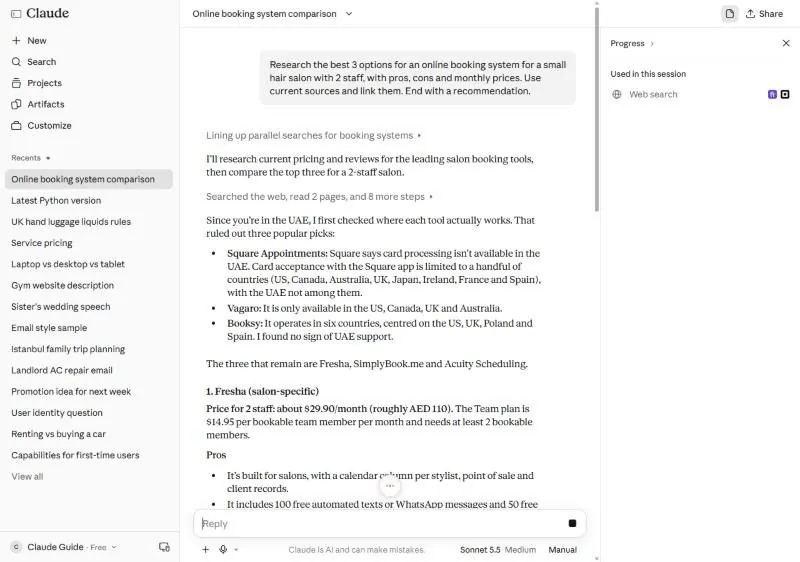
On the day of testing, the whole run took about two minutes on a free account.
6Watch out
- Say what you want compared and for whom. Without criteria, Claude compares everything and recommends nothing.
- Prices in the report are as of the pages it read. Check the two that matter before you pay.
7Go further
Follow up inside the same chat: Now compare only the top two on customer support and cancellation terms. The report is already on the desk, so the follow-up is fast. Chapter 2.5 shows how to run several research jobs at once with helpers.