
1In one sentence
Claude can look things up on the internet right now, instead of relying only on what it learned before, and it shows you where it looked.
2New words
- Web search — Claude reads live web pages to answer you. It decides to search when your question is about something current; you can also ask it to.
- Source — the page a fact came from. In the answer it appears as a small grey tag; click it to open the page.
- Knowledge cutoff — the date Claude's built-in knowledge ends. Anything after it, Claude only knows by searching.
3Why you would want it
Prices, versions, opening hours, news, laws and who-is-in-charge questions all change. Without search, Claude answers from memory and can be months out of date, confidently. With search, it reads today's pages and tells you which ones.
4Try it now
- Open a new chat and ask: What is the latest version of the Python programming language, and when was it released? (Any "latest" question works: a phone, an app, a sports result.)
- Watch the line "Searched the web" appear above the answer.
- Click one of the small source tags, or one of the links under Sources, and check the page says the same thing.
5What you will see
Claude searched twice: it noticed the first results were old, said so, and searched again with a more specific query. The answer gives the version, the date, a one-line summary of what is new, and a Sources list of four pages:
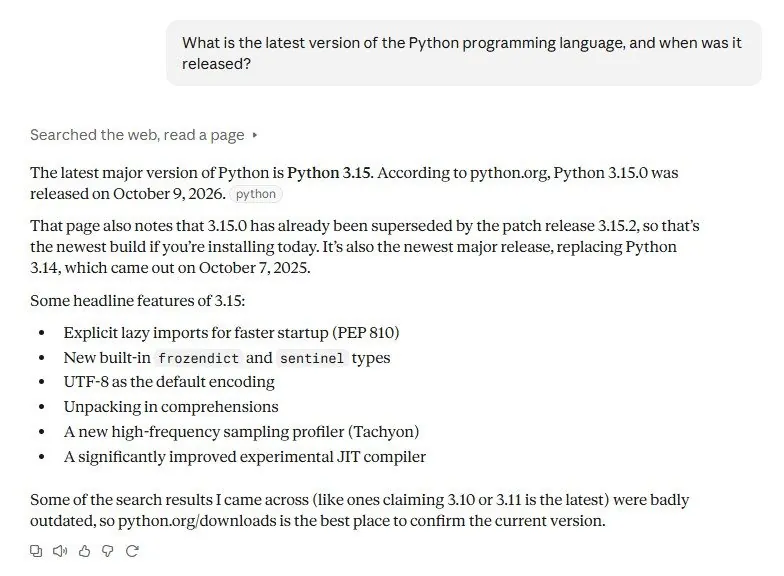
This is the behavior you want for anything current.
6Watch out
- If Claude does not search when it should, say search the web for this. If you want it to stop, say answer from what you know, do not search.
- A source tag is not proof. Open one. Occasionally a page says something slightly different from the summary.
7Go further
Ask a question that needs comparing several pages: Compare the three most popular electric cars under 40,000 dollars on range and price, with sources. For bigger questions, Chapter 1.4 (Research mode) does this at scale.