
1In one sentence
You can talk to Claude instead of typing, which is the best way to think out loud and get a tidy result at the end.
2New words
- Dictation — you speak, Claude turns it into text in the box, and you send it as usual. The microphone icon beside the box.
- Voice mode — a back-and-forth spoken conversation, mainly on the phone app, where Claude also speaks its answers.
- Transcript — the written version of what was said.
3Why you would want it
Most people think better when they talk. A ten-minute walk explaining a problem to Claude, followed by now give me that as a plan with three steps, produces more than an hour staring at a blank box. On the phone it also means hands-free: cooking, driving (passenger), walking the dog.
4Try it now
- On the phone app, open a new chat and tap the microphone.
- Talk for two minutes about a decision you are facing. Do not try to be tidy.
- Say or type: Summarize what I just said as three options with pros and cons.
5What you will see
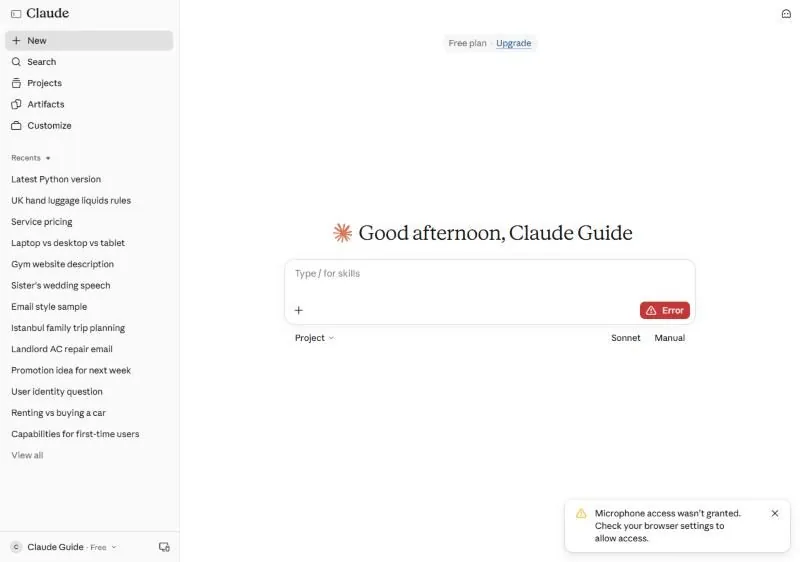
On the phone, your spoken words appear as text and Claude answers (and can read it aloud); the phone-sized view in Chapter 0.2 shows the microphone button at the bottom. On a computer, the microphone button works too, but the browser must be allowed to use the microphone; if it is not, you see this message, and the fix is in the browser's site settings:
6Watch out
- Noisy places and strong accents produce odd transcripts. Glance at the text before sending.
- Voice does not change what Claude knows. It still needs the context from Chapter 0.5.
7Go further
Use voice for the brief and typing for the edits: talk out the whole idea, then switch to text for shorter, more formal, add a step. Chapter 4.4 (let Claude ask first) works especially well out loud.