1In one sentence
Claude Code is Claude working inside your computer's files and programs: it reads, changes and runs code and files on its own, and tells you what it did.
2New words
- Code — the text instructions that make software work. You do not need to read it to use Claude Code, but Claude does.
- Terminal (also command line or CLI) — a text window where you type commands to the computer. Claude Code started there and still runs there, but it also runs in the Claude app, in the browser and in code editors.
- Repository (or repo) — a project folder kept under version control, usually on GitHub, so every change is recorded and can be undone.
- Session — one working conversation with Claude Code about one folder or repo.
3Why you would want it
Cowork (Part 2) does office work. Claude Code builds and fixes software, but it is also the strongest file-and-automation tool Claude has: give it a folder and it can rename, convert, analyze and script anything in it. If you are a developer, it is a colleague who reads the whole codebase before answering. If you are not, it is how a design (Part 3) becomes a working website.
4Try it now
(paid plans)
- In the Claude app, click the Code tab at the top of the sidebar (or open claude.ai/code in a browser, or install the command-line version from Anthropic's docs).
- Choose an environment (Default is fine) and, if you have one, a repo; otherwise start with no repository.
- Type: Create a small folder with a README that explains what this project is for, and list what you created.
- Read the plan it shows, approve, and look at the result.
5What you will see
The Code tab on the web: a new session, an environment chooser, and the task box with the model, the mode (Auto) and a repo button underneath:
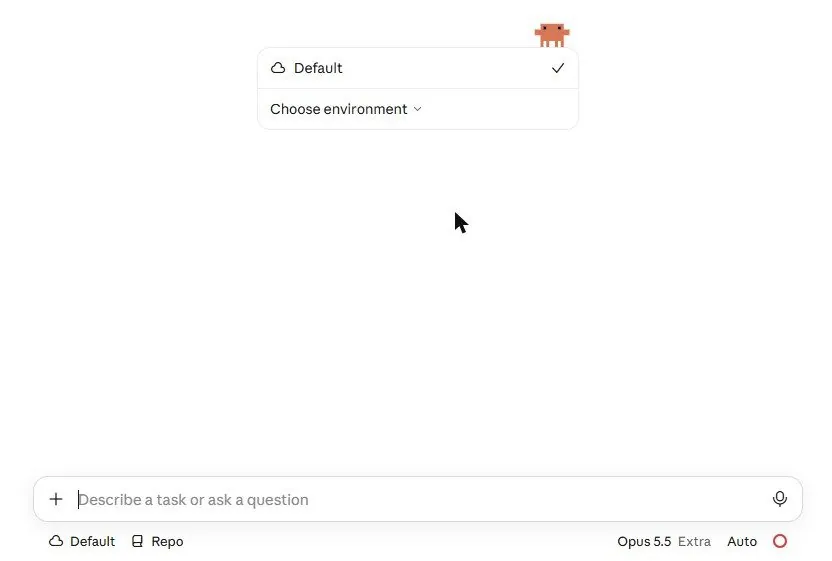
Claude Code explains what it will do, does it step by step (you see each file it creates or changes), and ends with a summary. In the terminal version the same happens as text; in the desktop app you also get visual diffs (side-by-side before and after).
6Watch out
- It can change files. Start in a copy or in an empty folder, and use a repo so every change can be undone.
- Auto mode is now the default: Claude judges each action and runs the low-risk ones itself. Chapter 6.10 explains the modes; switch to Default (ask every time) while learning.
7Go further
Open a real project and ask: Explain how this project is organized and where I would start to change [feature]. Chapter 6.2 shows how to make Claude Code follow your rules every time.