
1In one sentence
Claude can do a job for you every day or week, in the cloud, even while your computer is off, and deliver the result where you want it.
2New words
- Scheduled task — a job with a timetable: every Monday at 8, the first of the month, every evening. Claude runs it without you.
- In the cloud — on Anthropic's computers, not yours. Your laptop can be closed.
- Deliver — where the result goes: back into Claude, by email, into Slack, into a document.
3Why you would want it
A weekly summary of news about your industry, a Monday list of invoices due, a daily check of a competitor's prices, a Friday digest of your inbox. Each is ten minutes you no longer spend, and the result is waiting when you arrive.
4Try it now
(paid plans)
- Click Scheduled in the sidebar, then New task, then Set up manually (or Create with Claude to describe it in chat).
- Describe the job and the timing: Every Monday at 8am, search for news about [my industry] from the past week, summarize the 5 most important items with links, and put it in a document.
- Check the first result when it arrives and adjust the wording of the task if needed.
5What you will see
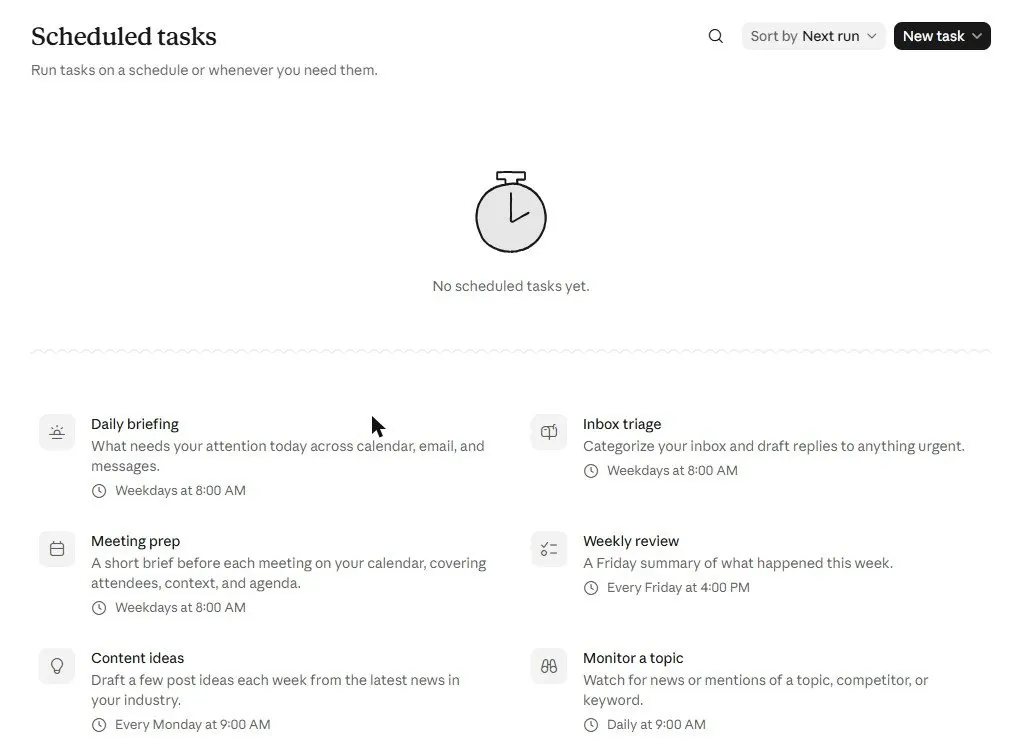
On paid plans, Scheduled appears in the sidebar. The page lists your tasks and offers ready-made ones: Daily briefing, Inbox triage, Meeting prep, Weekly review, Content ideas, Monitor a topic:
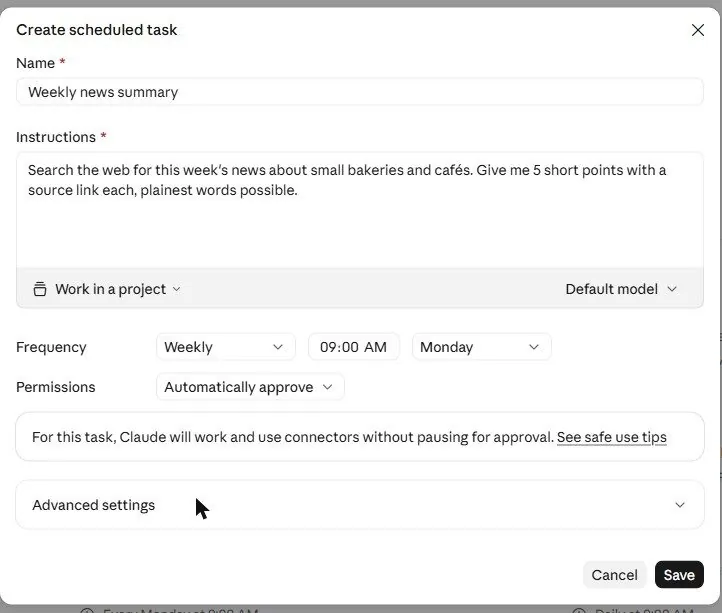
New task gives two choices: Create with Claude (describe it in chat) or Set up manually. The manual form asks for a name, the instructions, a Project to work in, the model, the frequency (hourly, daily, weekdays, weekly, monthly) with a time and day, and the permission mode:
After saving, the task shows its next run time, and each run appears as a chat you can open. On the free plan, the Scheduled page and the /schedule option do not appear.
6Watch out
- Start with one task that only reads and summarizes. Add tasks that send or change things only after you have seen a few good runs.
- Write the task as a complete brief (Chapter 4.2). The task runs without you there to answer questions.
7Go further
Combine a scheduled task with a connector: Every Friday at 5pm, read my calendar for next week and email me a one-paragraph preview. Chapter 2.1 shows the same idea for bigger jobs with Cowork.